Showing posts with label XML. Show all posts

Displaying XML

Displaying XML

Raw XML files can be viewed in all major browsers.You can use Microsoft Internet Explorer to view XML documents in the browser, just as you would view HTML pages. Unlike HTML, XML does not predefine display properties for specific elements. Therefore, XML requires a separate style sheet that specifies how the XML data should be displayed.

Viewing XML Files:


Look at the XML file above in your browser: note.xml

Most browsers will display an XML document with color-coded elements.

Often a plus (+) or minus sign (-) to the left of the elements can be clicked to expand or collapse the element structure.

To view raw XML source, try to select "View Page Source" or "View Source" from the browser menu.

Note: In Safari 5 (and earlier), only the element text will be displayed. To view the raw XML, you must right click the page and select "View Source".

Viewing an Invalid XML File:

If an erroneous XML file is opened, some browsers will report the error, and some will display it, or display it incorrectly.

<?xml version="1.0" encoding="UTF-8"?>
 - <note>
       <to>Tove</to>
       <from>Jani</Ffrom>
       <heading>Reminder</heading>
       <body>Don't forget me this weekend!</body>
   </note>

Try to open the following XML file: note_error.xml

Other XML Examples :

Viewing some XML documents will help you get the XML feeling:

An XML breakfast menu
This is a breakfast food menu from a restaurant, stored as XML.

An XML CD catalog
This is a CD collection, stored as XML.

An XML plant catalog
This is a plant catalog from a plant shop, stored as XML.

Why Does XML Display Like This? :

XML documents do not carry information about how to display the data.

Since XML tags are "invented" by the author of the XML document, browsers do not know if a tag like <table> describes an HTML table or a dining table.

Without any information about how to display the data, the browsers can just display the XML document as it is.

Displaying XML Files with CSS? :

Below is an example of how to use CSS to format an XML document.

We can use an XML file like cd_catalog.xml and a style sheet like cd_catalog.css

RESULT: The CD catalog formatted with the CSS file

Below is a fraction of the XML file. The second line links the XML file to the CSS file:

<?xml version="1.0" encoding="UTF-8"?>
<?xml-stylesheet type="text/css" href="cd_catalog.css"?>
<CATALOG>
  <CD>
    <TITLE>Empire Burlesque</TITLE>
    <ARTIST>Bob Dylan</ARTIST>
    <COUNTRY>USA</COUNTRY>
    <COMPANY>Columbia</COMPANY>
    <PRICE>10.90</PRICE>
    <YEAR>1985</YEAR>
  </CD>
  <CD>
    <TITLE>Hide your heart</TITLE>
    <ARTIST>Bonnie Tyler</ARTIST>
    <COUNTRY>UK</COUNTRY>
    <COMPANY>CBS Records</COMPANY>
    <PRICE>9.90</PRICE>
    <YEAR>1988</YEAR>
  </CD>
.
.
.
</CATALOG>

for detail visit w3schools

XML Attributes

XML Attributes

XML attributes are normally used to describe XML elements, or to provide additional information about elements. From HTML you can remember this construct: <IMG SRC="computer.gif">. In this HTML example SRC is an attribute to the IMG element. The SRC attribute provides additional information about the element.

XML elements can have attributes, just like HTML.

Attributes are designed to contain data related to a specific element.

XML Attributes Must be Quoted

Attribute values must always be quoted. Either single or double quotes can be used.

For a person's gender, the <person> element can be written like this:

<person gender="female">
or like this:

<person gender='female'>
If the attribute value itself contains double quotes you can use single quotes, like in this example:

<gangster name='George "Shotgun" Ziegler'>
or you can use character entities:

<gangster name="George &quot;Shotgun&quot; Ziegler">

XML Elements vs. Attributes

Take a look at these examples:

<person gender="female">
  <firstname>Anna</firstname>
  <lastname>Smith</lastname>
</person>

<person>
  <gender>female</gender>
  <firstname>Anna</firstname>
  <lastname>Smith</lastname>
</person>

In the first example gender is an attribute. In the last, gender is an element. Both examples provide the same information.

There are no rules about when to use attributes or when to use elements in XML.

My Favorite Way

The following three XML documents contain exactly the same information:

A date attribute is used in the first example:

<note date="2008-01-10">
  <to>Tove</to>
  <from>Jani</from>
</note>
A <date> element is used in the second example:

<note>
  <date>2008-01-10</date>
  <to>Tove</to>
  <from>Jani</from>
</note>
An expanded <date> element is used in the third example: (THIS IS MY FAVORITE):

<note>
  <date>
    <year>2008</year>
    <month>01</month>
    <day>10</day>
  </date>
  <to>Tove</to>
  <from>Jani</from>
</note>

Avoid XML Attributes?

Some things to consider when using attributes are:

attributes cannot contain multiple values (elements can)
attributes cannot contain tree structures (elements can)
attributes are not easily expandable (for future changes)
Don't end up like this:

<note day="10" month="01" year="2008"
to="Tove" from="Jani" heading="Reminder"
body="Don't forget me this weekend!">
</note>

XML Attributes for Metadata :

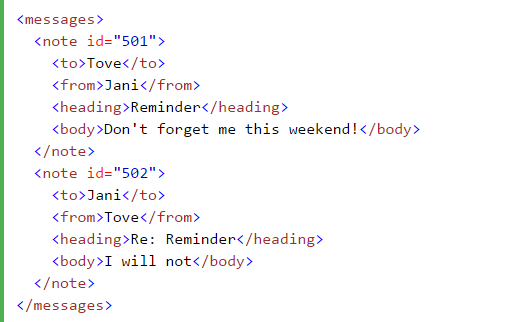
Sometimes ID references are assigned to elements. These IDs can be used to identify XML elements in much the same way as the id attribute in HTML. This example demonstrates this:


The id attributes above are for identifying the different notes. It is not a part of the note itself.

What I'm trying to say here is that metadata (data about data) should be stored as attributes, and the data itself should be stored as elements.


XML Elements

XML Elements

An XML document contains XML Elements.

What is an XML Element?

An XML element is everything from (including) the element's start tag to (including) the element's end tag.

<price>29.99</price>

An element can contain:
  • text
  • attributes
  • other elements
  • or a mix of the above


In the example above:

<title>, <author>, <year>, and <price> have text content because they contain text (like 29.99).

<bookstore> and <book> have element contents, because they contain elements.

<book> has an attribute (category="children").

Empty XML Elements

An element with no content is said to be empty.

In XML, you can indicate an empty element like this:

<element></element>
You can also use a so called self-closing tag:

<element />
The two forms produce identical results in XML software (Readers, Parsers, Browsers).

XML Naming Rules

XML elements must follow these naming rules:


  • Element names are case-sensitive
  • Element names must start with a letter or underscore
  • Element names cannot start with the letters xml (or XML, or Xml, etc)
  • Element names can contain letters, digits, hyphens, underscores, and periods
  • Element names cannot contain spaces
  • Any name can be used, no words are reserved (except xml).

Best Naming Practices

Create descriptive names, like this: <person>, <firstname>, <lastname>.

Create short and simple names, like this: <book_title> not like this: <the_title_of_the_book>.

Avoid "-". If you name something "first-name", some software may think you want to subtract "name" from "first".

Avoid ".". If you name something "first.name", some software may think that "name" is a property of the object "first".

Avoid ":". Colons are reserved for namespaces (more later).

Non-English letters like éòá are perfectly legal in XML, but watch out for problems if your software doesn't support them.

Naming Styles
There are no naming styles defined for XML elements. But here are some commonly used:

Style Example Description
Lower case <firstname> All letters lower case
Upper case <FIRSTNAME> All letters upper case
Underscore <first_name> Underscore separates words
Pascal case <FirstName> Uppercase first letter in each word
Camel case <firstName> Uppercase first letter in each word except the first

XML Elements are Extensible

XML elements can be extended to carry more information.

Look at the following XML example:

<note>
  <to>Tove</to>
  <from>Jani</from>
  <body>Don't forget me this weekend!</body>
</note>

For detail visit : w3schools

How Can XML be Used?

How Can XML be Used?


XML is used in many aspects of web development.
XML is often used to separate data from presentation.

XML Separates Data from Presentation:

XML does not carry any information about how to be displayed.
The same XML data can be used in many different presentation scenarios.
Because of this, with XML, there is a full separation between data and presentation.

XML is Often a Complement to HTML:

In many HTML applications, XML is used to store or transport data, while HTML is used to format and display the same data.

XML Separates Data from HTML:

When displaying data in HTML, you should not have to edit the HTML file when the data changes.

With XML, the data can be stored in separate XML files.

With a few lines of JavaScript code, you can read an XML file and update the data content of any HTML page.

Example:


Transaction Data:

Thousands of XML formats exists, in many different industries, to describe day-to-day data transactions:


  • Stocks and Shares
  • Financial transactions
  • Medical data
  • Mathematical data
  • Scientific measurements
  • News information
  • Weather services
For detail visit w3schools.


Introduction to XML

Introduction to XML

What you should already know

Before you continue you should have some basic understanding of the following:

WWW, HTML and the basics of building Web pages
Web scripting languages like JavaScript and VBScript
If you want to study these subjects, Go To W3Schools.

What is XML?


  • XML stands for EXtensible Markup Language
  • XML is a markup language much like HTML.
  • XML was designed to describe data.
  • XML tags are not predefined in XML. You must define your own tags.
  • XML is self describing.
  • XML uses a DTD (Document Type Definition) to formally describe the data.

The main difference between XML and HTML

XML is not a replacement for HTML.
XML and HTML were designed with different goals:

XML was designed to describe data and to focus on what data is.
HTML was designed to display data and to focus on how data looks.

HTML is about displaying information, XML is about describing information.

XML is extensible

The tags used to markup HTML documents and the structure of HTML documents are predefined. The author of HTML documents can only use tags that are defined in the HTML standard.

XML allows the author to define his own tags and his own document structure.

XML is a complement to HTML

It is important to understand that XML is not a replacement for HTML. In the future development of the Web it is most likely that XML will be used to structure and describe the Web data, while HTML will be used to format and display the same data.

XML in future Web development

We have been participating in XML development since its creation. It has been amazing to see how quickly the XML standard has been developed, and how quickly a large number of software vendors have adopted the standard.

We strongly believe that XML will be as important to the future of the Web as HTML has been to the foundation of the Web. XML is the future for all data transmission and data manipulation over the Web.

What is XML?

What is XML?


Extensible Markup Language (XML) is a markup language that defines a set of rules for encoding documents in a format which is both human-readable and machine-readable. It is defined by the W3C's XML 1.0 Specification and by several other related specifications, all of which are free open standards.


  • ML stands for EXtensible Markup Language
  • XML is a markup language much like HTML
  • XML was designed to store and transport data
  • XML was designed to be self-descriptive
  • XML is a W3C Recommendation


XML Example

<?xml version="1.0" encoding="UTF-8"?>
<note>
  <to>Tove</to>
  <from>Jani</from>
  <heading>Reminder</heading>
  <body>Don't forget me this weekend!</body>
</note>